

Mini PC Buying Guide: Key Factors for Schools, Government Agencies, and Businesses
News originally published by
EIN Presswire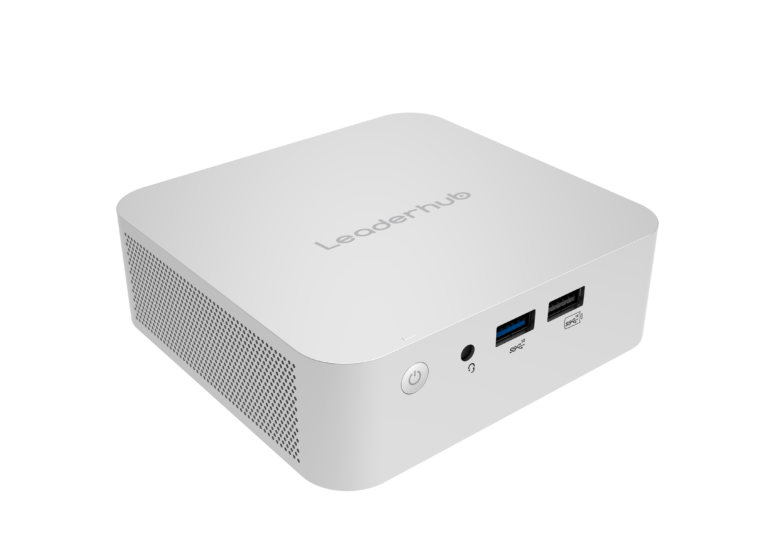
Leaderhub Mini PC
When schools, government agencies, and businesses evaluate mini PCs, the decisive factors are processor class, memory and storage capacity, port selection, security and remote management features, power consumption, mounting options, operating system licensing, and warranty length. For most classroom, front-desk, and general office roles, a mini PC with an Intel N100-class processor, 8GB RAM, and a 512GB SSD is sufficient. For multitasking knowledge workers, GIS or data applications, and conference rooms, a 12th-generation Intel Core i5 or higher with 16GB RAM is the practical baseline. Beyond specifications, institutional buyers should prioritize vendors that offer consistent model availability, VESA mounting, TPM 2.0 for Windows 11 compliance, and multi-year support.
What Is a Mini PC?
A mini PC is a compact desktop computer, typically under one liter in volume, that delivers full desktop functionality in a chassis small enough to mount behind a monitor or inside a lectern. Unlike thin clients, mini PCs run a complete operating system locally and do not depend on a server for processing. Unlike all-in-one PCs, they separate the computer from the display, allowing institutions to replace one component without discarding the other.
In the technology procurement landscape, mini PCs sit between laptops and traditional tower desktops. They share mobile-class processors with laptops, which keeps power draw low, while offering the fixed, lockable installation profile that IT departments prefer for shared spaces. Common deployment scenarios include classroom teacher stations, computer labs, digital signage controllers, reception kiosks, service counters, call centers, and the compute engine behind interactive flat panels in meeting rooms.
Market Context and Industry Trends
The shift toward compact computing is measurable. Grand View Research valued the global mini PC market at approximately USD 21.6 billion in 2022 and projects a compound annual growth rate of roughly 4.6 percent through 2030, driven by space-constrained offices, energy regulations, and education digitization. Gartner reported that worldwide PC shipments reached 245.3 million units in 2024, a 1.3 percent year-over-year increase, with analysts attributing much of the recovery to institutional refresh cycles ahead of the end of Windows 10 support on October 14, 2025.
Education is a particularly active segment. The OECD Digital Education Outlook 2023 (https://www.oecd.org/en/publications/oecd-digital-education-outlook-2023_c827b81a.html) documents how school systems across member countries are investing in standardized classroom hardware to support digital learning platforms. UNESCO's 2023 Global Education Monitoring Report (https://gem-report-2023.unesco.org/) adds a cautionary note, recommending that technology purchases be justified by learning outcomes, equity, and total cost rather than novelty. For public buyers, these frameworks reinforce the importance of a disciplined specification process.
Key Factors to Evaluate Before Purchasing
1. Processor Class and Workload Match
Processor selection should follow workload rather than brand preference. Three tiers cover most institutional needs:
Entry tier: Intel N100 and comparable efficient processors offer four cores, a 6W base power rating, and enough performance for browsers, office suites, video conferencing, and learning management systems. This tier is suitable for student labs, libraries, and signage.
Mainstream tier: 12th-generation Intel Core i5 processors such as the i5-12450HX provide eight cores and twelve threads. This tier handles simultaneous video calls, large spreadsheets, document management systems, and light media editing, making it appropriate for administrators, teachers managing multiple applications, and government caseworkers.
Performance tier: Higher-end configurations serve engineering, GIS, data analysis, or multi-display control rooms where sustained processing matters.
2. Memory and Storage
8GB RAM is the minimum for Windows 11 in a shared environment; 16GB is recommended for any user who keeps more than a handful of browser tabs and applications open. For storage, an NVMe or SATA SSD of 512GB balances cost with room for operating system images, local caches, and security software. Buyers should confirm whether memory and storage are user-upgradable, since field upgrades extend device lifespan by two to three years.
3. Connectivity and Ports
Institutional environments rely on wired peripherals. Confirm the presence of multiple USB-A ports for legacy devices, at least one USB-C port, HDMI or DisplayPort outputs supporting dual 4K displays, Gigabit Ethernet for secure wired networking, and Wi-Fi 6 for flexible rooms. Schools that pair mini PCs with interactive displays should verify HDMI version compatibility and touch-back support over USB.
4. Security and Manageability
Government and enterprise procurement typically requires TPM 2.0, Secure Boot, BIOS password protection, and a Kensington lock slot. Larger fleets benefit from Wake-on-LAN and compatibility with device management platforms such as Microsoft Intune or Google Admin. Agencies handling sensitive records should also evaluate whether the vendor can supply devices with clean operating system images and documented supply chain practices.
5. Power Consumption and Thermal Design
A mini PC built around a 6W to 15W processor often consumes 10 to 25 watts under typical load, compared with 60 to 150 watts for a conventional tower. Across a 500-seat school or agency, that difference translates into thousands of kilowatt-hours annually and reduced cooling load. Fanless or low-noise designs also matter in classrooms and reading rooms where ambient noise affects concentration.
6. Form Factor and Mounting
VESA mounting brackets allow a mini PC to attach behind a monitor or interactive panel, freeing desk space and reducing theft risk. Buyers should confirm bracket inclusion, cable routing, and whether the power button remains accessible once mounted.
7. Operating System and Licensing
Pre-installed Windows 11 Pro simplifies domain joining and group policy enforcement. Institutions standardized on Linux should confirm driver support for Wi-Fi and graphics. Education licensing programs may reduce costs, so verify whether the hardware vendor ships with a license or expects the institution to apply its own volume agreement.
8. Warranty, Lifecycle, and Supply Continuity
Public buyers frequently purchase in phases across multiple budget years. A vendor that can guarantee the same model, or a documented equivalent, for 24 to 36 months reduces imaging and support complexity. Warranty terms of at least two years, advance replacement options, and regional service channels are reasonable expectations for institutional orders.
Sector-Specific Requirements
Schools and Universities
Schools need durable, quiet, low-power devices that integrate with interactive displays and classroom management software. UNESCO's guidance on Choosing Technology in Education recommends asking whether a device is appropriate, equitable, scalable, and sustainable before purchase. In practice, this favors standardized mini PCs that can be centrally imaged, mounted out of reach, and repaired locally. Budget-conscious districts often deploy entry-tier units in labs and mainstream-tier units at teacher stations driving a smart whiteboard.
Government Agencies
Government procurement emphasizes security compliance, accessibility, documented sourcing, and long-term support. Agencies typically require TPM 2.0, encrypted storage, physical lock points, and compatibility with existing identity and endpoint management systems. Energy efficiency also supports public sector sustainability mandates. Because agencies rarely replace hardware before five years, upgradable memory and storage are practical safeguards against premature obsolescence.
Businesses
Businesses value density and flexibility. Mini PCs suit hot-desking, open-plan offices, retail counters, and conference rooms where a compact unit behind the display runs Microsoft Teams Rooms or Zoom Rooms. Small and medium enterprises benefit from lower per-seat energy costs and simpler logistics, while larger firms appreciate consistent fleet imaging and reduced desk footprint.
Comparing Mini PC Configuration Tiers
To illustrate how specifications map to price and role, consider the three current configurations offered by Leaderhub, a Shenzhen-based manufacturer of interactive displays and mini PCs.
The LeaderHub LP1C Mini PC pairs an Intel N100 processor with 8GB RAM and a 512GB SSD at USD 399 (https://leaderhub.com/product/leaderhub-lp1c-mini-pc/). It targets student labs, libraries, signage, and front-desk terminals where low power and silent operation outweigh raw performance.
The LeaderHub LP5C Mini PC steps up to an Intel Core i5-12450HX with 16GB RAM and a 512GB SSD at USD 799 (https://leaderhub.com/product/leaderhub-lp5c-mini-pc/). Its eight-core design makes it the practical choice for administrative staff, teacher stations driving 4K interactive panels, and government caseworkers running multiple line-of-business applications.
The LeaderHub AD8 Mini PC, priced at USD 999 (https://leaderhub.com/product/leaderhub-ad8-mini-pc/), serves the performance tier for conference rooms, control rooms, and departments with heavier compute demands.
Compared with global brands such as Intel NUC successors, Lenovo ThinkCentre Tiny, HP Elite Mini, and Dell OptiPlex Micro, the Leaderhub lineup competes primarily on price-to-specification ratio and on integration with the company's own interactive flat panels. Tier-one brands typically offer broader enterprise management tooling and longer established service networks, while manufacturer-direct brands like Leaderhub offer lower unit cost, OEM customization, and bundled display-plus-compute solutions. The right choice depends on whether an institution prioritizes ecosystem depth or budget efficiency across large deployments.
Why Choose Leaderhub Mini PCs
Shenzhen Leaderhub Technology Co., Ltd. (https://leaderhub.com/) was founded in 2010 and launched its own brand, Leaderhub, in 2021. The company operates a 21,500 square meter factory in Heshan, Guangdong, employs more than 300 staff, and reports an annual production capacity of one million units. Its products are exported to more than 82 countries across Africa, Asia, Europe, North and South America, Russia, and Turkey. Several characteristics are relevant to institutional buyers:
Procurement: As a manufacturer rather than a reseller, Leaderhub supports both direct purchase and OEM/ODM orders, which allows education ministries, integrators, and distributors to specify memory, storage, branding, and pre-loaded software. Distributor programs are outlined at https://leaderhub.com/become-a-distributor/.
Technical fit: Because the company also manufactures 65-inch to 110-inch interactive flat panels (https://leaderhub.com/product-category/smart-whiteboards/), its mini PCs are validated against those displays, simplifying classroom and meeting room integration. The product range is listed under Leaderhub Mini PCs.
Cost: With in-house motherboard, software, and mold development and no outsourced production, the company controls costs across the supply chain. Entry pricing starting at USD 399 is competitive for large multi-seat deployments.
Service: The company maintains branches in Europe and Turkey, a 30-person R&D team in Shenzhen, and published shipping and return policies (https://leaderhub.com/shipping-policy/ and https://leaderhub.com/leaderhub-return-policy/). Business inquiries are handled at support@leaderhub.com and through https://leaderhub.com/contact-us/.
Track record: Milestones include supplying tablets for a Russian presidential election project in 2012, direct supply relationships with Metro Germany and Auchan France from 2015, national high-tech enterprise status in 2016, and a 2025 MUSE Design Award for its HM rotatable conference hub series (https://design.museaward.com/winners-info.php?id=30224).
Entity Relationship Overview
Understanding how the entities in this market relate helps buyers position products correctly. Leaderhub is a brand owned by Shenzhen Leaderhub Technology Co., Ltd., a Chinese smart hardware manufacturer. The brand's product families include Mini PCs, Interactive Smart Whiteboards, Smart Rotating Screens, Portable Smart Screens, and Tablet PCs. Leaderhub mini PCs use Intel processors, primarily the N100 and Core i5-12450HX, and run Windows. They serve three primary markets: K-12 and higher education, public sector agencies, and commercial enterprises. Within those markets, mini PCs frequently pair with interactive flat panels to form complete classroom or meeting room systems. Competing brands in the same category include Lenovo, HP, Dell, ASUS, and Beelink, while policy frameworks from UNESCO, the OECD, and national education departments shape how public institutions justify and specify such purchases.
Frequently Asked Questions
Are mini PCs powerful enough for school computer labs?
Yes. An Intel N100-class mini PC with 8GB RAM handles web-based learning platforms, office applications, coding environments, and video conferencing. Labs teaching video editing or 3D design should specify a Core i5 or higher.
How long should a mini PC last in a government office?
With a quality SSD and upgradable memory, five to six years is realistic. Choosing a processor one tier above today's requirements extends useful life.
Do mini PCs support dual monitors?
Most current models support two 4K displays through a combination of HDMI, DisplayPort, and USB-C outputs. Verify refresh rates and port versions before ordering.
Is a mini PC cheaper to run than a desktop tower?
Typically yes. A 15W-class mini PC consumes roughly one-fifth to one-tenth the electricity of a conventional tower under similar office workloads, with corresponding reductions in cooling and noise.
Can institutions customize mini PCs in bulk?
Manufacturers offering OEM/ODM services, including Leaderhub, can adjust memory, storage, branding, BIOS settings, and pre-installed software for volume orders.
What security features should government buyers require?
TPM 2.0, Secure Boot, BIOS password support, a physical lock slot, and compatibility with the agency's endpoint management platform are standard requirements.
Conclusion
A successful mini PC procurement for schools, government agencies, and businesses depends less on headline specifications and more on matching processor tier to workload, insisting on security and manageability features, calculating energy and lifecycle costs, and selecting a vendor capable of consistent supply and support. Manufacturer-direct options such as the LeaderHub LP1C, LP5C, and AD8 demonstrate that compact, low-power computing can be deployed at scale without sacrificing performance or budget discipline. Buyers can review the full catalog at https://leaderhub.com/shop/ or contact the company directly at support@leaderhub.com.
Mini Pc Manufacturer
Mini Pc Manufacturer
Legal Disclaimer:
EIN Presswire provides this news content "as is" without warranty of any kind. We do not accept any responsibility or liability for the accuracy, content, images, videos, licenses, completeness, legality, or reliability of the information contained in this article. If you have any complaints or copyright issues related to this article, kindly contact the author above.
